


Wallet Cards | Digital Wallet
4.8215.00 Reviews
App Specs
- Version
- 2.5.19.1
- Updated On
- License
- Free
- Downloads
- 1,000,000+
- Developer
- DOSA Apps
- Categories
- Travel & Local
- Platform
- Android
Screenshots


 Analysis by AppCompare
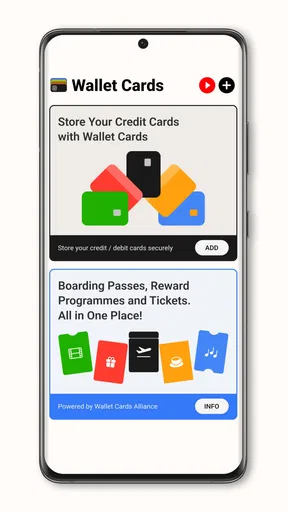
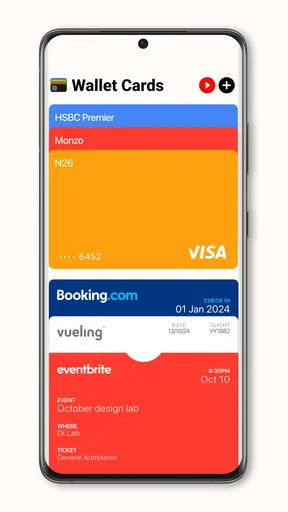
I use digital wallet tools for a simple reason: the cards I need should be easy to find when I’m away from home. Wallet Cards | Digital Wallet is aimed at that practical job, bringing digital cards together in one place. It is a free Travel & Local app from DOSA Apps, with optional in-app purchases. It suits people who want to organize cards on their phone, but it is important to approach it as a card-management utility rather than a full financial dashboard.
A useful routine starts with choosing the right cards
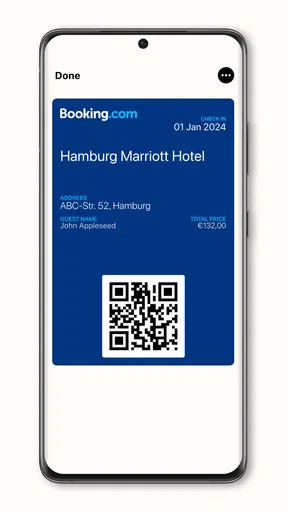
My first recommendation is to add only the cards you expect to use. A loyalty card for a regular grocery store, a gym membership card, or a ticket you need to present can be useful candidates. Starting with a short, familiar set makes it easier to see whether the app fits your daily habits before spending time organizing everything you own.
For a smooth routine, I would check each saved card as I add it: confirm its name is recognizable, make sure the card image or identifying details are clear, and remove duplicates if I accidentally add the same one twice. A wallet becomes less useful when it turns into a cluttered archive. Keeping the list focused is a small effort that pays off when there is a queue behind you and you need to find a card quickly.
Make the app part of a repeatable habit
The best use case is not necessarily replacing every physical card. I would treat the app as a convenient home for the cards I repeatedly forget or rarely carry, while keeping a physical backup for anything essential. That split is especially sensible for travel: a digital copy can save rummaging through a bag, but a backup reduces the risk of being stuck if your phone is unavailable or a venue cannot accept the digital version.
A realistic routine might be to add a membership card before heading out, check that it is easy to identify, then open it before reaching the checkout rather than while standing at the counter. For a trip, I would gather the cards I expect to need before leaving and review the collection once, instead of trying to add and sort items in a hurry at the airport or hotel desk. These habits make the app more useful without assuming it can replace every venue’s own process.
Where it fits among wallet alternatives
Compared with carrying a stack of plastic cards, a digital collection can be lighter and easier to search visually. Compared with a phone’s built-in wallet, a dedicated card organizer may appeal if your goal is to keep a broader assortment of cards together. The trade-off is that you may need to decide which wallet is your main one and avoid maintaining conflicting or outdated copies in several places.
I would not choose this app as a substitute for a bank’s official app when I need to check balances, move money, or manage payments. Nor would I assume that storing a card digitally guarantees that every shop or service can scan or accept it. If a card is tied to an organization’s own app or requires live account information, using that official app may be the safer and more direct option. The right choice depends on whether you need convenient card access or financial account management.
Worth Reading Before You Choose

EA SPORTS FC Mobile 26 Is a Bigger Football Game, but It Takes Time

Flipboard Shows What News Apps Must Do Beyond the Feed

Switching to Android Auto Means Rethinking Your Driving Routine

Google Calendar Makes a Crowded Week Easier to Manage

Ludo King Makes the Most of the Minutes Between Plans

Baby Panda World Brings Quick Play to Modern Phones, but Its Game Library Feels Busy
What to check before relying on it
Before making a digital card your only copy, test it in a low-pressure situation. Open the card while you have a moment, check that its identifying details are legible, and find out whether the place you plan to visit accepts that format. This is more useful than discovering a compatibility issue at a busy counter. If a card is important for entry, travel, or identity verification, I would keep the original or another accepted backup until I know the digital version works for that specific purpose.
It is also worth reviewing your collection from time to time. Memberships expire, card designs change, and a saved image can stop being useful if the information is no longer current. Removing cards you no longer use keeps the list manageable and reduces the chance of presenting the wrong one. I would avoid putting sensitive documents into a general card collection unless the app and the issuing organization clearly support that use.
Who will appreciate this kind of organizer
This is most appealing to someone who carries several loyalty or membership cards and wants a tidier way to keep them accessible. It can also help an occasional traveler who wants to gather relevant cards before leaving, provided those cards are accepted digitally. People who already rely on a built-in wallet and have only a few cards may find that their existing setup is enough; adding another organizer would then create more maintenance than convenience.
If you prefer a financial overview with budgets, bank syncing, and transaction reports, look for a dedicated personal-finance app instead. Those features solve a different problem. For card storage, the practical question is whether the app makes your particular cards easier to retrieve and present. I would decide based on that task, not on expectations of budgeting or account monitoring.
Getting Started with Wallet Cards
First things first, setting up Wallet Cards | Digital Wallet is a breeze. Download it from the app store, and you’re greeted with a sleek, intuitive interface. You don’t need to be a tech wizard to navigate through the initial setup. I was cruising through it in just a few taps.
Once you’re in, linking your bank accounts and credit cards is as simple as pie. The app supports a wide range of financial institutions, so you’re covered no matter where you bank. I found the process to be secure and straightforward, which is a big relief when dealing with sensitive financial data.
Features That Stand Out
Now, let’s dive into what makes this app tick. One feature that caught my eye is the smart budgeting tool. It’s like having a financial advisor whispering in your ear. You can set spending limits for different categories, and the app gently nudges you when you’re nearing your cap. It’s perfect for those of us who have a tendency to overspend on food delivery!
The app also excels in transaction tracking. Every swipe of your card is logged and categorized. This feature is a lifesaver when it comes to pinpointing where your money is actually going each month. You might be surprised how those little expenses add up!
Security and Peace of Mind
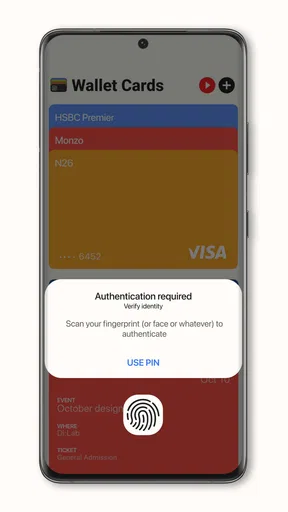
If you’re anything like me, security is a top priority when it comes to handling money online. Thankfully, Wallet Cards offers top-notch security features. With biometric authentication and encryption, it feels like Fort Knox for your finances. Plus, you can remotely lock the app if your phone goes missing, which is a neat touch.
Integration and Connectivity
Another ace up its sleeve is the seamless integration with other apps and services. Whether you’re syncing with your calendar to manage bill payments or exporting reports for tax season, the app plays well with others. It’s all about making your financial life as streamlined as possible.
Room for Improvement
No app is perfect, and while Wallet Cards | Digital Wallet does a lot right, there are a couple of areas that could use some fine-tuning. Occasionally, syncing with certain banks can take a bit longer than expected, which can be slightly frustrating when you’re in a rush.
Also, while the app is loaded with features, some users might find the sheer number of options a tad overwhelming at first. A simplified tutorial or guided setup could ease this learning curve for newcomers.
Final Thoughts
All in all, Wallet Cards | Digital Wallet is a robust tool for anyone looking to take control of their finances. It’s packed with features that are both practical and intuitive, making it a must-have for budgeting and financial planning. While there’s a bit of room for improvement, it’s nothing that detracts from the app’s overall utility and convenience.
So, if you’re ready to ditch the spreadsheets and start managing your money with ease, give Wallet Cards a try. Trust me, your wallet will thank you!
Availability and a sensible first test
The app is rated for Everyone, has an average rating of 4.0 from around 6.3 thousand ratings, and has been installed over a million times. It was released on January 14, 2021, and the current version is 2.5.15; it supports Android 5.0 and later. Those details make it accessible to many Android users, though the best test is still whether the cards you personally use are practical to store and present in it.
There is no upfront charge to try it, while optional in-app purchases range from $0.99 to $99.99 per item. I would begin with the free experience and decide whether the core card-organizing task is useful before considering any purchase. If your needs are limited to a few cards, there is little reason to pay for extras until you understand what they add to your own routine.
My verdict after weighing the trade-offs
What matters most with a wallet app is dependable access, not an impressive-looking list of features. I would keep the collection tidy, check important cards before relying on them, and maintain a physical or official-app backup where acceptance matters. That approach makes digital storage a convenience rather than a single point of failure.
For someone who regularly juggles membership and loyalty cards, this is worth trying as a dedicated organizer. For someone seeking bank balances, payment controls, or a verified replacement for every physical card, it is the wrong tool. I like the idea of keeping routine cards close at hand, but I would judge the app by a simple question: does it help me find and use my own cards with less fuss? If the answer is yes, it has earned a place on my phone.
Pros
- Integrates with major payment platforms.
- Secure encryption for personal data.
- Customizable card categories available.
- Easy card management and organization.
- User-friendly interface and navigation.
Cons
- Limited support for international cards.
- Occasional sync issues with some banks.
- Ads can be frequent without premium.
- No offline access to card details.
- Limited support for cryptocurrency cards.
FAQs for Wallet Cards | Digital Wallet
What is Wallet Cards and how does it work?
Wallet Cards is a digital wallet app that allows users to store and manage various types of cards, such as credit, debit, membership, and loyalty cards, all in one place. The app uses secure encryption to protect your data, providing easy access to your cards whenever you need them. It's designed to streamline your wallet and reduce the clutter of physical cards.
Is Wallet Cards secure for storing sensitive information?
Yes, Wallet Cards employs strong encryption protocols to ensure that your sensitive information is kept safe. The app uses secure servers and provides features like biometric authentication (fingerprint or face recognition) to add an extra layer of security. Regular updates are also released to enhance security measures continuously.
Can I use Wallet Cards offline, or do I need an internet connection?
Wallet Cards can be used offline to access stored card information, which is particularly useful when you're in locations with limited internet connectivity. However, an internet connection is required for initial setup, syncing data across devices, and downloading updates to ensure all features work properly.
Are there any fees associated with using Wallet Cards?
Wallet Cards offers a free version with basic features, which is sufficient for most users. However, there might be a premium version available for a subscription fee, offering additional features such as advanced security options, cloud backup, and priority customer support. It's advisable to check the app store for the latest pricing details.
What devices are compatible with Wallet Cards?
Wallet Cards is available for both Android and iOS devices. It supports a wide range of models, typically requiring a minimum OS version to ensure optimal performance. Users should check the app store listing for specific compatibility details to ensure that their device meets the necessary requirements.


